

Core Java interview questions and answers:
1. What is the difference between String and StringBuilder in Java?
| Feature | String | StringBuilder |
| Definition | String is an immutable class in Java, which means once an object is created, its value cannot be changed. | StringBuilder is used to create mutable string objects, which means we can change the content of the StringBuilder object. |
| Operation | Any operation that tries to modify the string will eventually create a new string object in the string pool constant. | We can modify the content of a StringBuilder object without creating a new object. |
| Thread-safety | String is thread-safe in Java. | StringBuilder is not thread-safe in Java. |
| Concatenate | In Java, when you concatenate two string objects using the + operation, a new string object is created to store the result. | We can concatenate two StringBuilder objects by using the append method. |
| When to use | A string should be used when the contents of the string won’t change frequently. | StringBuilder should be used to create a string when we want multiple modifications to it. Say, concatenation, insertion, or deletion. |
2. What is the difference between Scanner and BufferReader in Java?
| BufferedReader | Scanner |
| BufferedReader is a class in Java, present in java.io package. | Scanner class is present in java.util package in Java. |
| BufferedReader reads text from character based input stream. | Scanner is used to parse and process primitive values from various sources such as standard input, files or string. |
| It is efficient for reading larger amount of character data | It is suitable for simpler inputs. |
| It throws checked exception. Example: IOException. | Scanner uses exception for flow control. Example: InputMismatchException, NoSuchElementException. |
3. What is the difference between final, finally and finalize in Java?
Final
final is a modifier in Java applicable for classes, methods and variables.
- If a variable is declared as final then it will become constant and you can not perform re-assignment for that variable.
- If a method is declared as final then you can not override that method in Child class.
- If a class is declared as final then you can not extend that class .i.e., you can not create Child class of that class.
Finally
finally is a block in Java and it is always associated with try-catch block.
try{
  // Risky code
}catch(Exception e){
  // Handling code
}finally{
  // Cleanup code
}We can have finally block with catch block also.
Finalize()
finalize is a method in Java present inside Object class which is invoked by garbage collector just before destroying an object to perform cleanup activities. We can explicitly call finalize() method. But, it does not mean it trigger garbage collection.
Test t = new Test();
t.finalize(); // Not necessarily it will invoke the garbage collection4. What is the difference between String and StringBuffer in Java?
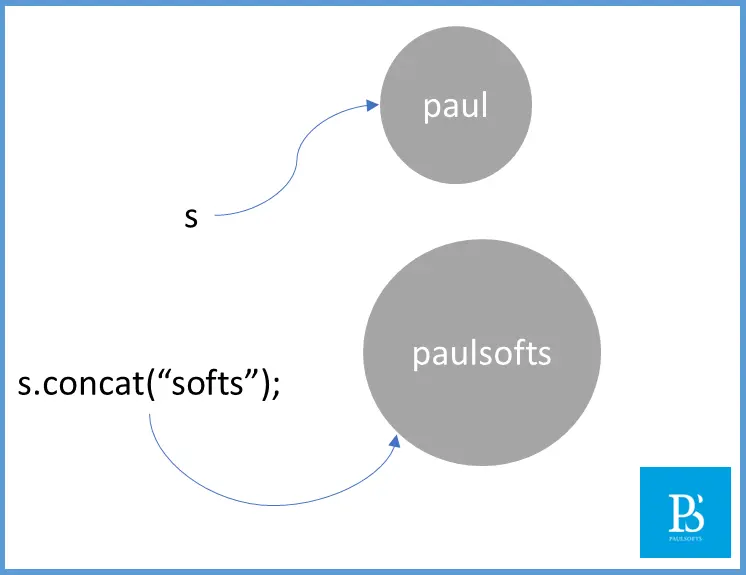
In Java, the main difference between String and StringBuffer is that the String is immutable whereas StringBuffer is mutable in nature, which means once you create a String object you can not perform any change in that object. If you tried performing any change, a new object will be created in the String Pool Constant. But, if you create a StringBuffer object you can perform any type of change to the existing object as StringBuffer are immutable in nature.
String s = new String("paul");
s.concat("softs");

System.out.println(s); // Output: paul
String is immutable, so methods like concat(), replace(), substring(), etc. return a new String rather than modifying the original String.
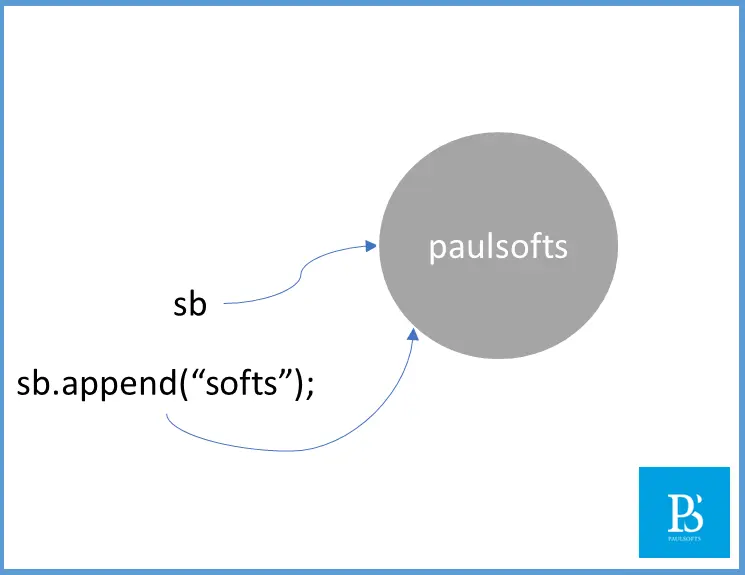
StringBuffer sb = new StringBuffer("paul");
sb.append("softs");
System.out.println(sb); // Output: paulsofts
StringBuffer is mutable, so append() modifies the existing StringBuffer object itself.
5. What is the difference between StringBuffer and StringBuilder?
- The main difference between StringBuffer and StringBuilder is that String Buffer is synchronized while StringBuilder is not synchronized in Java.
- Both StringBuffer and StringBuilder are used whenever change is required in the string. [In Java, StringBuffer and StringBuilder are mutable in nature.]
- StringBuilder is exactly same as StringBuffer having same methods and constructor.
| StringBuffer | StringBuilder |
| Every method present inside StringBuffer is synchronized. | No method present inside StringBuilder is synchronized. |
| At a time only one thread is allowed to operate on StringBuffer object. Hence, it is thread safe. | Multiple threads can operate simultaneously on StringBuilder object. Hence, it is not thread safe. |
| StringBuffer is introduced in Java 1.0 version. | StringBuilder is introduced in 1.5 version. |
import java.lang.*;

Class Test{
  public static void main(String[] args){

    // StringBuffer and StringBuilder having the same methods and constructors
    // The only difference is that StringBuffer is synchronized whereas StringBuilder is not sycnchronized in nature.

    StringBuffer buffer = new StringBuffer("paul");
    buffer.append("softs");
    System.out.println(buffer); // Output: paulsofts

    StringBuilder builder = new StringBuilder("paul");
    builder.append("softs");
    System.out.println(builder); // Output:  paulsofts
  }
}6. What is the difference between “==” Operator and equals() method in Java?
- The “==” operator is meat for the reference comparison.
- The equals() method is meant for the content comparison.
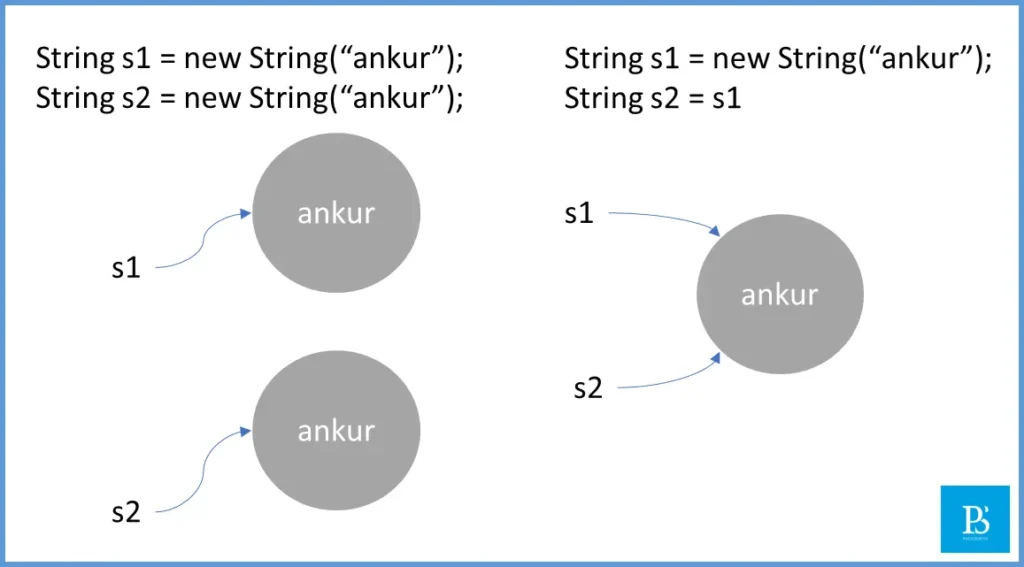
String s1 = new String("ankur");
String s2 = new String("ankur");

System.out.println(s1==s2); // false ==> Comparing the reference of s1 and s2 variables

System.out.println(s1.equals(s2)); // true ==> Comparing the content of s1 and s2 variablesWhenever we create a String using “new” keyword, JVM always create a new String object in the heap.
7. Difference between Child c = new Child(); and Parent p = new Parent();
| Child c = new Child() | Parent p = new Parent() |
| If you know the exact runtime type of the object then you should use this approach. | If you don’t know the exact runtime type of object then you should use this approach. |
| By using Child reference you can call both Child as well as Parent class method. | Parent class reference can be used to call methods available in Parent class only. You can not call Child class method with this approach. |
| Child reference to use Child class object only. | Parent reference can be used to hold both Parent as well as any Child class object. |
8. Difference between Exception and Error in Java?
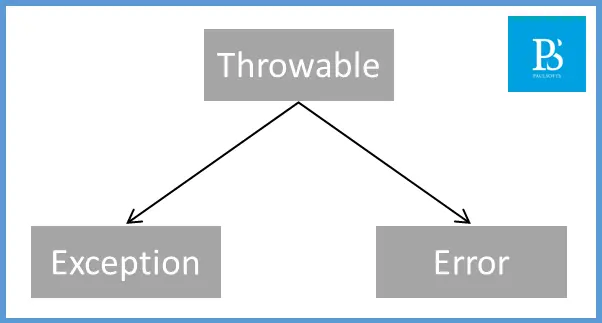
Before you understand the difference between exception and error, you should know java exception hierarchy.
- Throwable class acts as the root of Java exception hierarchy.
- Throwable class contains 2 child class
- Exception
- Error
| Exception | Error |
| The exceptions are caused by our program or developer mistake. | The errors are caused by the lack of system resources. |
| Exceptions are recoverable in nature. | Errors are non-recoverable in nature. |
| Example: If your program is required to read data from a file at remote location and at runtime the file is not available then you will get FileNotFoundException. If FileNotFoundException occur then you can provide local file and the rest of the program will continue executing normally. | Example: GTA-5 required 8 GB of RAM to run and your system has only 4GB RAM, it will not execute. |
try{
  // Read file from remote location
}catch(FileNotFoundException e){
  // User local file and continue the rest of program's execution
}